Motorcycle Service Log & Maintenance Record
Record what you did to your motorcycle and when. Each entry resets the service clock for every part you select, so the dashboard always shows what is due next.
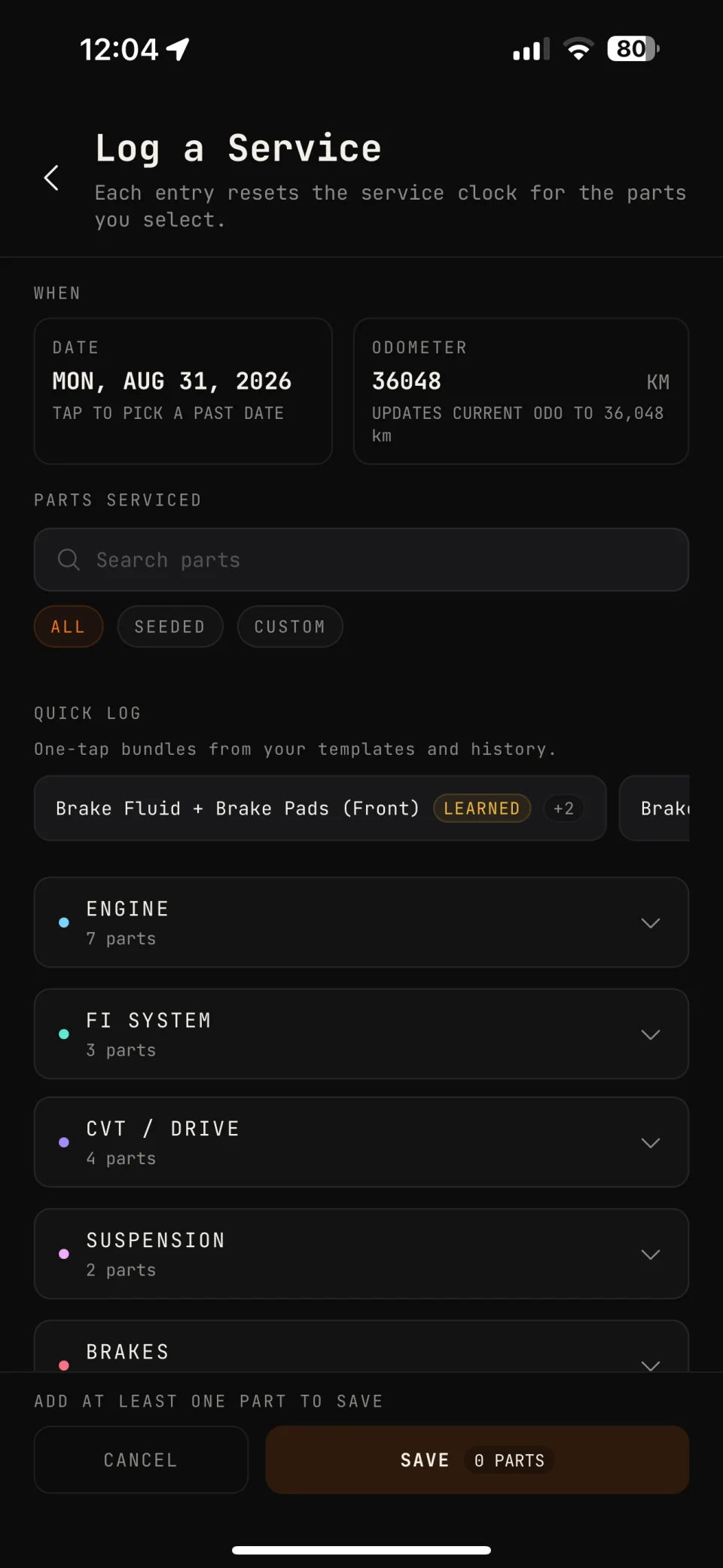
What a service entry records
- Date and odometer — when the work was done and at what reading.
- Parts serviced — chosen from the parts MACHINA tracks for your ride type, grouped into Engine, Brakes, Chain / Drive, CVT / Drive, FI System, Suspension, Wheels & Tires and Electrical.
- Cost and shop — what you paid and where the work was done.
- Notes — oil brand, mechanic notes, anything you want on record.
- Receipt photo — taken with the camera or picked from your photo library. Tap it later to view it full screen.
Fast to log, even with greasy hands
- Due parts first — parts that are due soon or overdue sit at the top of the list, flagged, so the usual job is already in front of you.
- One-tap templates — Oil Change, Chain Service, Brake Service, CVT Service, Tire Change and Major Service select every part in the job at once.
- Learned bundles — two parts you service together in at least two logs become a one-tap chip.
- Swipe to log — swipe a part on the status screen to log it in one motion.
- Custom parts — add anything the factory list leaves out, with its own km and month interval.
How the service clock resets
Every part has an interval by distance, by time, or both. Logging a part sets its last service to that entry’s odometer reading and date, and MACHINA counts down to the next one, whichever limit comes first.
Between odometer updates, MACHINA projects your odometer from your own riding rate, so countdowns keep moving when you have not opened the app in weeks. Log a manual reading any time to correct it.
Your full service history
- Every entry lands on one timeline per motorcycle, with lifetime cost, parts count and average spend on top.
- Each entry shows cost, odometer, distance since the last service, shop and notes.
- Just added a bike, or bought one used? A guided baseline screen logs the maintenance already done, so tracking starts accurate from day one.
Take your records with you
- PDF service history — export the full log for a buyer when you sell the bike, or for a shop that asks what has been done.
- Backup and restore — save the whole garage, every motorcycle and every record, to one JSON file and restore it exactly as it was.
- On your phone only — no account, no cloud. Logging works offline, in a basement car park or on a mountain road.
Questions
Do I need an account or a connection to log a service?
No. Your service log lives on your device, and logging works offline.
Can I log a service I did months ago?
Yes. Set the service date and the odometer reading at the time, and the countdown starts from that point.
Can I edit or delete an entry?
Yes. Open an entry to edit its parts, cost or notes, or swipe it in History to delete it.
Can I show my service history when I sell the bike?
Yes. Export a PDF of the full log and send it to the buyer.
Know your ride.
One-time purchase on the App Store. Android is on the way.